
Streamline GitHub Workflow with Zokyo
Overview
Zokyo is a developer-focused browser extension designed to centralize GitHub issue management directly within the user’s browser environment. By integrating seamlessly with GitHub, the tool allows developers to access, track, and manage their assigned issues without navigating between multiple tabs or relying on external project management tools. This streamlined approach reduces context switching and enhances productivity during development cycles.
The extension is particularly beneficial for developers managing multiple repositories or collaborating across teams, where keeping track of assigned tasks and their status is critical. It enables real-time visibility into active issues, supports on-the-fly edits, and facilitates quick resolution by allowing users to close tickets when work is complete. The tool is intended for use in professional development workflows, especially in agile or continuous integration environments.
Developed by Zokyo, the extension operates as a lightweight utility that enhances existing GitHub workflows rather than replacing them. Its primary value lies in consolidating issue tracking into a single, accessible interface, minimizing browser clutter and improving focus. The developer did not provide additional information about the company’s background or broader product ecosystem.
Key Features & Capabilities
- Centralized Issue Dashboard – Aggregates all assigned GitHub issues into a unified interface, eliminating the need to open multiple browser tabs or navigate through repository dashboards.
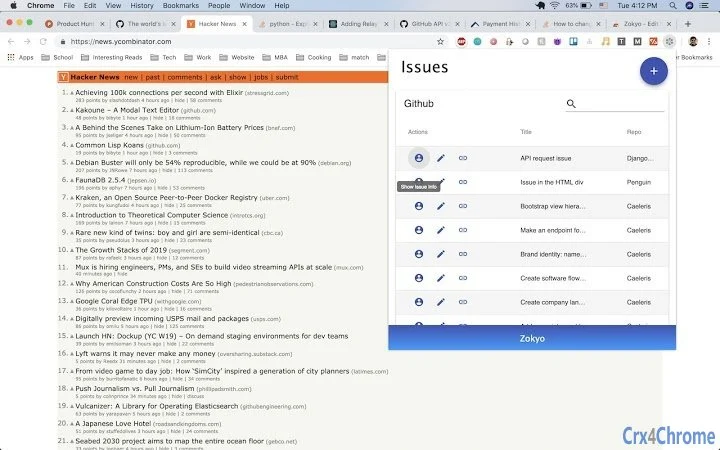
- Real-Time Issue Viewing – Displays current status, labels, assignees, and comments for each issue, allowing developers to quickly assess priority and context.
- On-the-Fly Issue Editing – Enables immediate updates to issue details, such as descriptions, labels, or status, when new information becomes available during development.
- Issue Creation – Allows users to create new issues directly from the dashboard, streamlining task assignment and backlog management without leaving the current workflow.
- Issue Resolution Tracking – Provides a clear mechanism to mark issues as resolved, helping maintain accurate project status and reducing follow-up overhead.
These features support efficient task management during coding sprints, debugging sessions, or daily stand-ups. For example, a developer can review all pending issues while writing code, update a ticket with a new fix detail, and close it upon completion—all within the same interface. This reduces workflow interruptions and improves accountability across team tasks.
User Interface, Workflow & Performance
The user interface is designed to be minimal and functional, focusing on clarity and speed. The dashboard presents issues in a clean list format with essential metadata, such as title, repository name, assignee, and status. Navigation is intuitive, with filtering and sorting options likely available to prioritize tasks by urgency or repository.
Workflow efficiency is enhanced by eliminating the need to switch between GitHub pages or external tools. Developers can interact with issues directly from the browser toolbar, reducing time spent on navigation. The extension integrates with the browser’s native environment, suggesting it operates with low latency and minimal impact on page load times.
The developer did not specify resource usage details. Performance observations are based on general software behavior patterns. Stability is expected to be consistent with typical browser extensions, especially given the small file size of 1.5 MB. No reported crashes or compatibility issues were mentioned.
Compatibility & System Requirements
Zokyo is compatible with Windows, Mac, and Linux operating systems, making it accessible to a broad range of developers regardless of their primary platform. The extension is designed for use with modern web browsers that support Chrome extensions, though specific browser versions were not listed.
The installation size is 1.5 MB, indicating a lightweight footprint that should not significantly impact system storage or startup performance. Exact system requirements were not listed. The developer did not provide information on minimum CPU, RAM, or disk space specifications.
Compatibility information is limited to the supported OS platforms. No details were provided about integration with specific IDEs or version control tools beyond GitHub.
Pros and Cons
Pros
- Centralizes GitHub issue tracking in a single, accessible dashboard
- Eliminates tab clutter and reduces context switching
- Enables quick issue creation and real-time editing
- Supports issue closure directly from the interface
- Lightweight at 1.5 MB with broad OS compatibility
Cons
- Functionality is limited to GitHub integration only
- No information on advanced features like automation or team collaboration tools
- Exact system requirements and browser compatibility details were not provided
- Limited visibility into performance under heavy usage
- Developer contact is via email, with no formal support channel
FAQ Section
Is Zokyo compatible with all major web browsers?
Zokyo is designed to work with browsers that support Chrome extensions. Specific browser compatibility details were not provided by the developer.
Is the extension safe to use with my GitHub account?
Zokyo accesses GitHub data through standard OAuth authentication. The developer did not provide information on data handling practices or security protocols.
How often are updates released?
Update frequency was not specified. Users are encouraged to subscribe to the mailing list for announcements about new features.
Can I use Zokyo offline?
As a browser extension that relies on GitHub API connectivity, Zokyo requires an active internet connection to function.
Is there a license or subscription required to use Zokyo?
Zokyo is available at no cost. The software is free to use with no subscription model currently in place.
Final Thoughts
Zokyo offers a focused and practical solution for developers seeking to simplify GitHub issue management. Its ability to consolidate tasks into a single dashboard reduces workflow friction and enhances concentration during coding sessions. The tool’s lightweight design and broad OS support make it accessible to diverse development teams.
While the extension lacks advanced collaboration or automation features, its core functionality is well-executed and directly addresses a common pain point in developer workflows. For teams that rely heavily on GitHub and want to minimize browser distractions, Zokyo delivers tangible productivity gains.
Download Zokyo now to streamline your GitHub task management and reclaim your workflow focus.







